Export to DaVinci Resolve
Last updated: November 10, 2026
SpaceCut exports your edit to DaVinci Resolve as an XML timeline (.xml, in the Final Cut Pro 7 format). Resolve imports it with your tracks, cuts, zooms and sound, linked to your original footage: your files are not copied and not re-encoded. Animations come as video clips already on the timeline, captions as an .srt file, and color grades as .cube LUTs.
How to export
- In SpaceCut, click Export and choose the DaVinci Resolve tab.
- Click Export. SpaceCut writes a folder named
export/<your edit>/inside your project and shows it to you. - In DaVinci Resolve, choose File › Import › Timeline and pick the
.xmlfile.
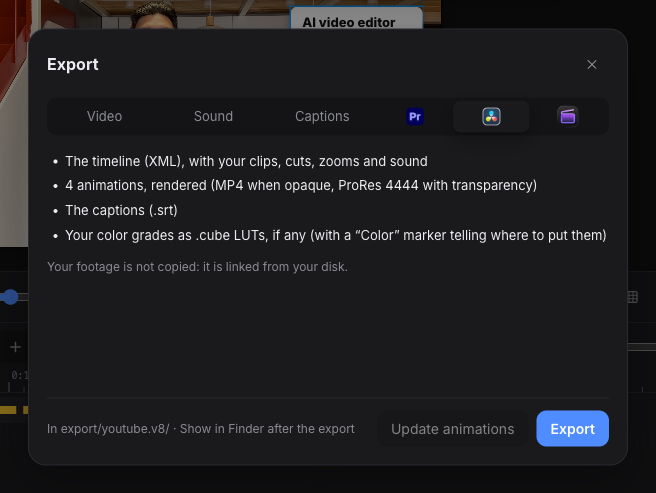
What is in the export folder
| File | What it is |
|---|---|
<your edit> (DaVinci Resolve).xml |
The timeline: tracks, clips, cuts, zooms, sound, markers |
animations/ |
One video file per animation. ProRes 4444 when it has transparency, H.264 MP4 when it fills the frame |
<your edit>.srt |
Your captions, if they are on |
color/ |
One .cube LUT per color grade, if you graded |
What is different from the Premiere Pro export
The timeline is built the same way as for Premiere Pro, so the list of what carries over applies here too. Three things differ.
- Nested sequences arrive flat. Their clips are laid out on the tracks just above, instead of inside a compound clip.
- Color goes on a node. Grades arrive as
.cubefiles. A Color marker on the first clip of each grade says which LUT to load. Vignette and grain do not fit in a LUT: the marker gives you their values. - Sizes follow Resolve’s default scaling. The export assumes the project setting “Scale entire image to fit”. If you changed that setting, clips can come in at a different size.
Questions
What format does SpaceCut export for DaVinci Resolve? An XML timeline in the Final Cut Pro 7 format (.xml), which Resolve imports with File › Import › Timeline.
Does SpaceCut copy or re-encode my footage? No. The XML links to your original files where they are on your disk. Only the animations are rendered.
How do I bring in the captions?
Import the .srt file with File › Import › Subtitle. It carries the text and the timing, not the caption style you set in SpaceCut. For styled captions, render the MP4 from SpaceCut.
Resolve shows the clips as offline. What now? A source file has moved or been renamed since the export. Select the clips in the Media Pool, right-click and relink them to the files. SpaceCut warns you before exporting if a file is already missing.
Do I need DaVinci Resolve to use SpaceCut? No. You can render an MP4 straight from SpaceCut. See what SpaceCut does and the prices.