Export to Premiere Pro
Last updated: November 10, 2026
SpaceCut exports your edit to Adobe Premiere Pro as a Final Cut Pro 7 XML file (.xml). Premiere opens it as a sequence with your tracks, cuts, zooms and sound, linked to your original footage: your files are not copied and not re-encoded. Animations come as video clips already placed on the timeline, captions as an .srt file, and color grades as .cube LUTs.
How to export
- In SpaceCut, click Export and choose the Premiere Pro tab.
- Click Export. SpaceCut writes a folder named
export/<your edit>/inside your project and shows it to you. - In Premiere Pro, choose File › Import and pick the
.xmlfile. The sequence appears in your project, ready to open.
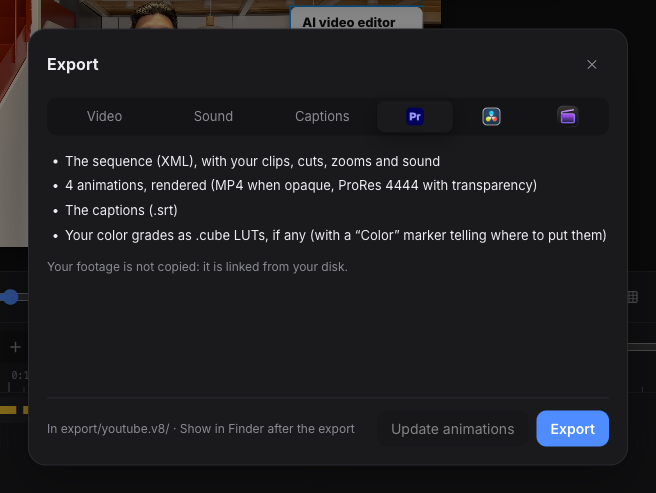
What is in the export folder
| File | What it is |
|---|---|
<your edit> (Premiere Pro).xml |
The sequence: tracks, clips, cuts, zooms, sound, markers |
animations/ |
One video file per animation. ProRes 4444 when it has transparency, H.264 MP4 when it fills the frame |
<your edit>.srt |
Your captions, if they are on |
color/ |
One .cube LUT per color grade, if you graded |
What carries over
| In SpaceCut | In Premiere Pro |
|---|---|
| Tracks and cuts | The same video and audio tracks, in the same order. Locked tracks stay locked |
| Video with its sound | Linked clips |
| Scale, position, crop | Motion (Scale, Position) and Crop |
| Zooms | Scale keyframes. An eased zoom becomes a keyframe every 2 frames |
| Fades and opacity | Opacity keyframes |
| Rotation | Rotation. Phone footage shot sideways comes in upright |
| Speed and reverse | Time Remapping, at a constant speed |
| Volume, fades, music ducking | Audio level keyframes |
| Crossfades at audio cuts | Constant Power transitions |
| Nested sequences | Nested sequences |
| Disabled clips, clip names, In and Out | Kept |
| Your notes | Sequence markers |
| Animations (titles, lower thirds, transitions) | Video clips, at the same time on the same track |
What needs a hand in Premiere
An XML file cannot carry everything. For each thing it cannot carry, SpaceCut leaves a marker in the sequence that tells you what to do.
- Color. Grades arrive as
.cubefiles, not as Lumetri settings. A Color marker on the first clip of each grade says which LUT goes where (Lumetri › Basic Correction › Input LUT). Vignette and grain do not fit in a LUT: the marker gives you their values. - Captions. The
.srtcarries the text and the timing for Premiere’s caption track. It does not carry the caption style or the word animation you set in SpaceCut. For styled captions, render the MP4 from SpaceCut. - Speed ramps. A ramped clip arrives at its average speed, so it starts and ends on the same frames. A Speed ramp marker lists the keyframes to redo with Time Remapping.
- Volume above +12 dB. Premiere caps the level when it imports XML. SpaceCut lowers the curve under the cap and adds an Audio gain marker with the decibels to add back (Audio Gain, G).
- Animations. In Premiere they are video files, not editable graphics. To change one, change it in SpaceCut and click Update animations: only the ones you changed are rendered again, under the same file names, so Premiere shows the new version without a new import.
Smaller limits: clip label colors are not exported, a zoom animated on a clip shown inside a frame arrives at a fixed size, and the sound of a nested sequence keeps a fixed volume.
We check this export with Premiere Pro 26.5.
DaVinci Resolve and Final Cut Pro
The same Export window has a tab for each. DaVinci Resolve gets an XML timeline built the same way: see Export to DaVinci Resolve. Final Cut Pro gets an FCPXML project (Final Cut Pro 10.6 or later); this one is in beta.
Questions
What format does SpaceCut export for Premiere Pro? A Final Cut Pro 7 XML file (.xml), which Premiere Pro imports with File › Import. It is not a .prproj project file.
Does SpaceCut copy or re-encode my footage? No. The XML links to your original files where they are on your disk, not to preview copies. Only the animations are rendered, because Premiere has no equivalent for them.
Premiere says “Media Offline”. What now? A source file has moved or been renamed since the export. Right-click the clip, choose Link Media, and point Premiere to the file. SpaceCut warns you before exporting if a file is already missing.
Do I need Premiere Pro to use SpaceCut? No. You can render an MP4 straight from SpaceCut. The export is there if you want to finish in your own editor. See what SpaceCut does and the prices; the agent runs on your own Claude Code or Codex plan.
Which versions of Premiere Pro work? We test with Premiere Pro 26.5. Premiere has imported this XML format for many years, so older versions should open it, but we have not tested them.